TP-Link Smart Wi-Fi LED Bulb for Easy Home Automation

How many times have you settled into a good movie at home, only to notice the main light is still on? How about sleeping in bed and maybe a pet or loved one is asleep on your shoulder but you just don’t want to reach over to turn the light off and disturb them? Maybe you are out late shopping but want the security of turning the lights on back at home like you are there or having them turned on so you don’t enter a dark house? All of these are options with the TP-Link Smart Wi-Fi LED Bulb.

Enter TP-Link Home Automation Options. Over the next several months I will walk you through the various setup, logistics, and requirements in taking your home from drab to modern tech-fabulous! If you have wondered how you can get started with home automation, without breaking the bank or hiring a technician, follow along with me folks….

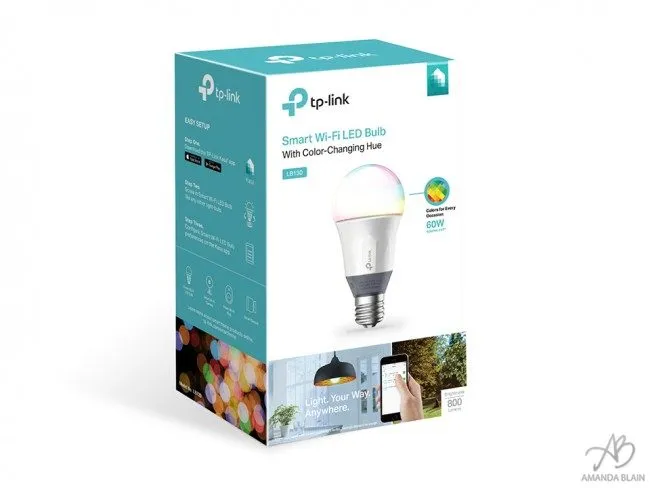
The TP-Link LB130 Smart Wi-Fi LED Bulb is where we will start this journey. This light bulb is slightly larger than a regular sized light bulb you are familiar with as shown in this lovely photo here, but the base of the light bulb is the same. The Technical standards are an A19 Bulb (This describes that the bulb is pear shaped) and E26 base fitting (This is the Medium Standard Base size in North America).
This is important because it means it will fit most standard light sockets in your house with no additional hardware or complicated wiring setups. You are literally just screwing in a light bulb to enter the high-tech automation world.
The lightbulb has Wi-Fi built right into it. It will need to be close enough to your router so that it is “always connected”. This is how the light bulb does all the really cool features. The router is a really important piece in getting a good home automation network setup. I will go over this in detail in upcoming posts, but for now, just know that all your home automation pieces will connect back to your router – the heart of it all, so it needs to be a good one.
The next simple step in the process is to download the control app for your phone – Kasa. It is available on both Android and iPhone. The TPLink Lightbulb also works with Amazon Alexa.
How to Setup Your TP-Link LB130 Smart Wi-Fi LED Bulb

Nothing could be easier than this setup. The App is very intuitive and makes setting up various schedules or moods a breeze. Check out these screenshots for an idea.
Awesome Home Automation Light Bulb Features
These lights have some really neat features that you can use to automate around your house.
Let’s go through some of the highlights shall we?
- The light bulb is LED based and has the awesome ability to create MILLIONS of Colors. Having a spooky Halloween party? Orange lights. Christmas Time Dinner? Green. Feeling a little Blue… ? Blue up your room.
- The App includes an Energy Saving Stats Screen. If you are worried about the rising cost of electricity bills, these lights bulbs offer you all the statistic you would ever need to monitor exactly what your lights are doing. Check out your kWh for today, this week and the last 30 days. The expected electricity cost for the YEAR is about $1.32 – based on 11¢/kWh and 3 hrs a day of use!
The lifetime of the bulb is expected to be about 22.8 YEARS. Wow. This is the last light bulb you will need to buy for awhile. Of course this make them really great for those hard to change Light Bulb spots around your house.- There is no additional hardware required to get up and going. Lightbulb, App, Done.


Amazon Echo Voice Connected

One of the really cool parts about TP-Link products is that they work with Amazon Echo. Now, many of us in Canada have not been graced with the amazing experience that is Amazon Echo so I’ll go over that in another post. If you happen to have an Echo, Dot or Fire Stick though – sync right up with Alexa and Bam! Voice control activated lights.
How Much Does The TP-Link Light bulb Cost?
The Cost of the TPLINK LB130 Smart Wi-Fi Light bulb is currently $49.95 at Best Buy Canada. There is no additional cost for setup, no subscription services, and no additional fees.

The TP-Link LB130 Smart Wi-Fi LED Bulb is a great, easy and inexpensive way to get started in the home automation market. The features in the Kasa app are plentiful and you are able to customize and automate lights with ease within a few minutes of setup time. If you have wanted to try out home automation lights, without a huge upfront cost check the TP-Link LB130 Smart Wi-Fi LED Bulb out!
Tp-link has partnered with me to provide the light bulbs I’ve used and this sponsored post. Thoughts as always are my own.
Recent Posts
How To Cast Oculus Quest 2 VR to TV, Computer, Phone and Mixed Reality
If you want to show your friends what you are playing in VR, follow this…
How to Install Virtual Desktop on Oculus Quest 2 and Play SteamVR Wirelessly
So you bought a Quest 2 and want to wireless connect to your PC, play…
Is VR Safe For Kids? Can Kids Use the Meta Quest 2 VR?
Your children have requested a Meta Quest 2 VR headset because all their friends are…
Must Have Popular VR Oculus Quest 2 Games
What are the must-have VR Oculus Quest 2 Games? Much like all video games, there…
Should You Buy The Oculus Quest 2? Is VR ready?
Its finally here! Facebook has released the quest 2, but should you get it? Which…
What is 5G and Is it Harmful to Our Health?
What is 5G Wireless Technology? 5G (Fifth Generation of Wireless Technology) is actually really cool,…